

Copy the euro symbol € with one click below. On Windows, hold Alt and type 0128 on the number pad. On a Mac, press Option + Shift + 2. The euro is the money of 21 European countries, and its currency code is EUR.
Euro signU+20AC
Euro sign and related symbols · Click any symbol to copy it.
Euro symbol codes
Here is the euro sign and the currency signs people often need next to it, with the HTML code and the Windows Alt code. Each sign in the tool above also shows its Unicode number.
| Sign | HTML | Alt |
|---|---|---|
| € Euro sign | € | 0128 |
| ₠ Old ECU sign | ₠ | None |
| £ Pound sign | £ | 0163 |
| ¥ Yen sign | ¥ | 0165 |
| ¢ Cent sign | ¢ | 0162 |
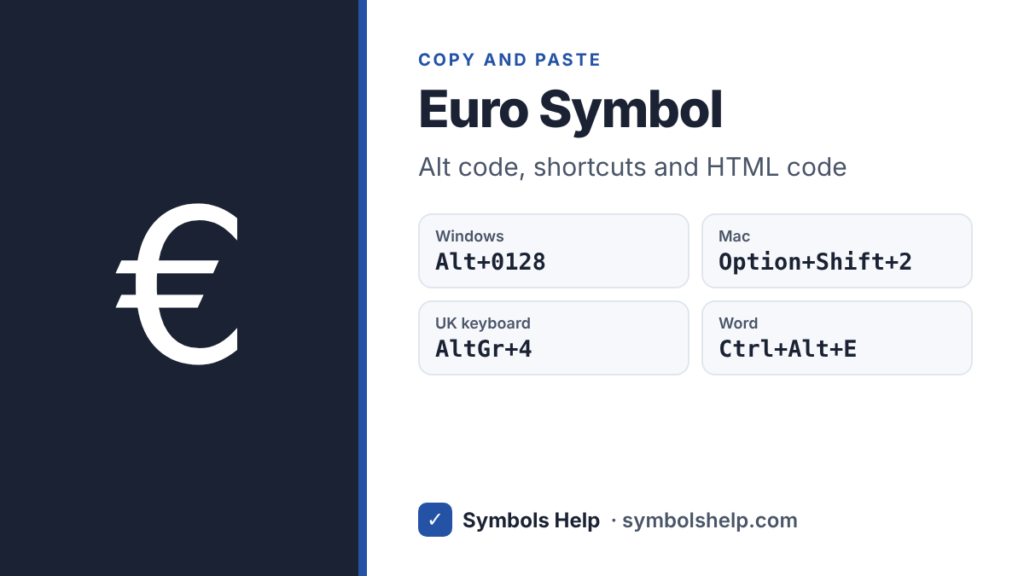
Do not skip the zero. Alt + 0128 gives €, but Alt + 128 gives Ç. Codes with a leading zero use the Windows-1252 character set, where Microsoft gave the euro the free slot 128. Codes without it use the old DOS set, where 128 was already taken. Our Alt Code Finder shows both kinds.
How to type the euro symbol
The fastest way depends on your keyboard. Find yours in this list.
| Keyboard | Keys |
|---|---|
| Any Windows PC | Alt + 0128 on the number pad |
| Windows, UK keyboard | AltGr + 4 |
| Windows, German, French, Spanish or Italian keyboard | AltGr + E |
| Windows, US-International | AltGr + 5 |
| Mac, US keyboard | Option + Shift + 2 |
| Mac, UK keyboard | Option + 2 |
| Microsoft Word | Ctrl + Alt + E |
| Chromebook | Ctrl + Shift + U, then 20ac and Space |
| iPhone and Android | Hold the $ key |
Windows
AltGr is the Alt key on the right side of the space bar. On European layouts, Ctrl + Alt does the same job if you prefer the left side. On a US laptop with no number pad, press Windows key + . (period), click the Ω tab and open the currency symbols. Our Alt codes guide explains Num Lock and the other details.
Mac
Press Option + Shift + 2 on a US keyboard, or Option + 2 on a UK one. For any other layout, press Control + Command + Space and search for “euro”. Our Mac symbols guide has more shortcuts.
Microsoft Word
Press Ctrl + Alt + E, or type 20AC and press Alt + X. See our Word symbols guide for the other ways.
Google Docs
Go to Insert > Symbols > Special characters and type “euro” in the search box. Our Google Docs guide shows the rest of that menu.
Excel and Google Sheets
For prices, do not type € into each cell. In Excel, open Format Cells > Number > Currency and pick € Euro. In Google Sheets, use Format > Number > Custom currency and search for euro. The cells stay real numbers, so your totals keep working. For the sign on its own, =UNICHAR(8364) gives €.
iPhone and Android
Open the number keys, then press and hold the $ key. On iPhone and most Android keyboards, a small menu pops up with €, £ and ¥. Slide to € and let go.
HTML, CSS and LaTeX
In HTML, use € or €. In CSS, use content: "\20AC";. In LaTeX, \texteuro works in most setups, or load the eurosym package and use \euro.
Does the euro sign go before or after the number?
It depends on the language. In English, the sign goes before the amount with no space: €10 or €4.99. The EU’s own style guide for English says the same. In German, French, Spanish and Italian it usually goes after the number with a space, and the decimal mark is a comma: 4,99 €.
Most countries simply kept the style they used for their old money, so you will see both. When you write for readers in several countries, the code is the clearest choice: EUR 4.99.
Is there a euro cent sign?
No. There is no official symbol for euro cents. People write 50 c, 50 ct or simply €0.50. The ¢ sign belongs to US and Canadian cents and is rarely used for the euro. Our currency symbols page lists the signs of other countries.
What the euro sign means
The European Commission showed the design to the public on 12 December 1996. It is based on the Greek letter epsilon (ε), the first letter of the word Europe, and the two lines across it stand for stability. The euro became the official money in 1999, and the coins and notes arrived in 2002.
Today 21 countries use it. Bulgaria was the latest to join, on 1 January 2026. Unicode added € in version 2.1 in 1998, so only very old fonts and devices show a box instead.
You may also see ₠, the euro-currency sign. It stood for the ECU, the unit of account used before the euro, and was never the sign of the euro itself.
Frequently asked questions
What is the Alt code for the euro symbol?
Alt + 0128 on the number pad, with Num Lock on. On most European keyboards, AltGr + E or AltGr + 4 is quicker.
How do I type € on a laptop without a number pad?
Press Windows key + . (period), click the Ω tab and pick € from the currency symbols. In Word, Ctrl + Alt + E works on any keyboard.
Why does Alt + 128 give Ç instead of €?
Without the leading zero, Windows uses the old DOS character set, where 128 is Ç. Type 0128 instead.
What is the HTML code for the euro sign?
€ or €. Both work in every browser.
How do I type the euro sign on a Mac?
Option + Shift + 2 on a US keyboard, or Option + 2 on a UK keyboard.
Sources: the Unicode Currency Symbols chart (U+20AC, U+20A0), the European Union page on the euro design and the European Commission notice Bulgaria adopts the euro. Written by Muhammad Ilyas, updated October 2026.
More money signs: all currency symbols in one place, the Alt Code Finder and our symbol finder with over 240 symbols.
About this page
- Written and checked by: Muhammad Ilyas
- Last updated: October 16, 2026
- Source: Unicode code chart: Currency Symbols (U+20AC)